Watercolour fills
The move that makes a fill look painted is replacing coverage with accumulation: instead of filling a polygon with a colour, stamp many soft, semi-transparent dabs inside it and let them overlap.
"water_feat": { "op": "features", "source": "basemap", "layer": "water" },"water": { "op": "fill-dabs", "features": "@water_feat", "color": "$water", "opacity": 0.22, "radius-px": "$water-radius", "hardness": 0.5, "paint": 1.0, "spacing-px": 3.0, "position-jitter": 0.9, "size-jitter": 0.4, "opacity-jitter": 0.3, "value-jitter": 0.08}This is from
watercolor.json.
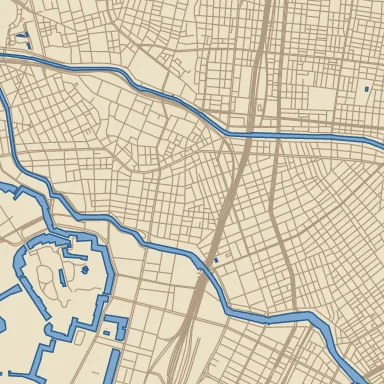
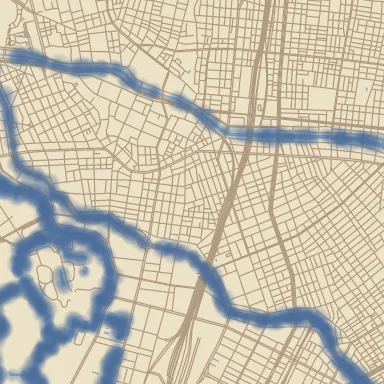
fill-solid on the left, fill-dabs on the right.Reading the knobs
Section titled “Reading the knobs”opacitylow, dabs many. 0.22 is doing the work. Each dab barely tints the paper; overlaps darken. Raise it and you get poster paint, not watercolour.spacing-pxagainstradius-px. Spacing well below the radius means heavy overlap and a solid wash; spacing near the radius leaves paper showing through at the edges. Start at roughlyradius / 2.hardnesssoftens the dab profile. Low values feather the boundary, which is what stops the fill reading as a polygon.- The four jitters are what defeat the eye’s pattern detection.
position-jitterbreaks the grid,size-jitterbreaks the silhouette,opacity-jitterandvalue-jitterbreak the flatness of the colour. Without them you get texture that looks generated.
The border question
Section titled “The border question”Every jitter here is derived from world coordinates, so a dab lands in the same place with the same size no matter which tile is being rendered. Two adjacent tiles compute an identical wash in the overlap region, and the seam does not exist. This is a property of the op, not something you configure — see tiles and determinism.
Turn on the tile-grid overlay in ezu serve and look along a boundary: dabs
should straddle it.
Softening the whole tile
Section titled “Softening the whole tile”A small blur over the finished composite reads as the paper wicking:
"c3": { "op": "blend", "base": "@c2", "over": "@water" },"out": { "op": "blur", "input": "@c3", "sigma": "$softness" }Blur costs padding — 3σ of margin on every side, computed for you and budgeted
from the param’s declared max. That is why softness declares
{ "min": 0, "max": 4 }; an unnecessarily generous max costs render time on
every tile. See padding and neighbours.
Layering washes
Section titled “Layering washes”Real watercolour builds up. Two passes with different radii, blended, beat one pass with a bigger radius:
"water_wide": { "op": "fill-dabs", "features": "@water_feat", "color": "$water", "opacity": 0.12, "radius-px": 12, "spacing-px": 6, "position-jitter": 1.0 },"water_tight": { "op": "fill-dabs", "features": "@water_feat", "color": "$water", "opacity": 0.18, "radius-px": 5, "spacing-px": 2.5, "position-jitter": 0.7 },"water": { "op": "blend", "base": "@water_wide", "over": "@water_tight" }Both reference the same features node, which is evaluated once — fan-out is free
because the cache is content-addressed.
When a flat fill is the right answer
Section titled “When a flat fill is the right answer”Not every layer should be dabs. In watercolor.json the landmass and landuse are
plain fill-solid, and only water and roads are painted. Flat washes underneath
give the eye somewhere to rest, and they are far cheaper — a fill-dabs layer at
z15 over dense polygons is one of the most expensive things a style can do. Paint
the layers a viewer looks at; fill the ones they look past.
Map renders on this site are made fromOpenStreetMap data viaProtomaps (© OpenStreetMap contributors), elevation from Re:Earth Terrain,Mapterhorn andEGM2008 (NGA), and aerial imagery from GSI Japan(© 国土地理院). The painterly styles use CC0 brushes byDavid Revoy.